
Ansible is an open source configuration management solution that takes the form of a script performing user-defined actions via SSH on one or more machines. It automates tasks like installations across many machines while customizing configurations.
The software has numerous extensions that make it almost never necessary to use raw Linux commands in scripts. All these modules also allow Ansible to test whether a task needs to be executed based on the machine’s state – for example, if instructed to start a process that is already running, Ansible will skip it and move to the next action.
This solution can be used, for example, to automatically install services on a server, automatically deploy code to production, etc.
Installation
Ansible is installed via the package manager:
sudo apt-get install ansible
Then simply create a folder with the necessary files and directories for your script.
How It Works
Ansible is built around two main systems: playbooks (composed of tasks) and hosts. Playbooks contain the list of actions to perform, and the hosts file contains the list of servers grouped by group.
Example playbook:
---
- hosts: webservers
  sudo: yes
  tasks:
  - name: install packages
    apt: name="{{ item }}" update_cache="yes" state="present"
    with_items:
      - "git"
      - "nginx"
      - "php7.0"
      - "php7.0-mysql"
      - "php7.0-curl"
      - "php7.0-json"
      - "php7.0-cgi"
  - name: install php on nginx
    template: src=nginx.conf dest=/etc/nginx/sites-available/default.conf
    notify:
      - restart php7-fpm
      - restart nginx
  - name: Create symlink
    file: src=/etc/nginx/sites-available/default.conf dest=/etc/nginx/sites-enabled/default.conf state=link
...
Example hosts file:
[servers_group1]
192.168.1.200
[servers_group2]
192.168.1.201
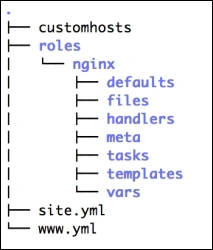
Around these two main files, Ansible’s creators added other files to enhance scripts. Variables, roles, templates, and handlers were added.
Variables make configuration management very simple. Roles are the equivalent of functions in programming. Templates are modified configuration files; when called, required variables are inserted into the final file. Handlers perform actions only when a notification is sent by the task file – for example, restarting a service after modifying its configuration.
Example of an Ansible script structure organized by roles:
Of course, this is a scripting system, and the examples above cannot represent all possibilities. In future articles, I will detail how other more concrete cases work.
Conclusion
In my opinion, Ansible is an essential tool for deploying services to production and managing a server fleet. The solution also has its own content-sharing system called “Galaxy”. However, Ansible can be relatively difficult to learn, particularly due to the file architecture that can vary depending on role usage and the lack of documentation on certain points (such as modifying the SSH connection in recent versions).