
This article covers the procedure for setting up a MySQL Master-Master (and Master-Slave) server with a load balancing system using the round robin algorithm (via HAProxy).
In our example, we will have three servers: one managing load balancing (named SRV-LBSQL with IP address 10.0.0.100) and two MySQL servers connected to each other (named SRV-MYSQL01 and SRV-MYSQL02 with IP addresses 10.0.0.1 and 10.0.0.2 respectively). Each MySQL server will process SQL queries in turn. The database servers will replicate data between each other using a dual Master-Slave relationship.
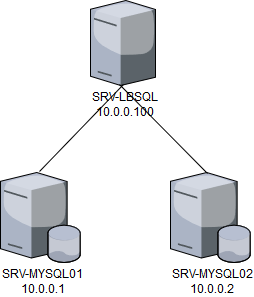
Installing MySQL Services
To install both servers, simply install the MySQL package:
apt-get install mysql-server
Configuring MySQL Servers
To connect to the databases, you need the “mysql-client” package installed on the connecting machine, then run:
mysql -u root -p Password -h localhost
Create the “bdd” database on both servers:
CREATE DATABASE bdd;
Then create a test table on server 1:
CREATE TABLE test (
    ID INT NOT NULL AUTO_INCREMENT,
    Test VARCHAR(100) NOT NULL,
    PRIMARY KEY (ID)
);
Create a dump of the database and send it to server 2:
mysqldump -u root -p bdd > bdd.sql
scp bdd.sql [email protected]:/root/
On server 2, import the dump:
mysql -u root -p bdd < bdd.sql
Then modify the /etc/mysql/my.cnf file on both servers.
Set these values on server 1:
bind-address=10.0.0.1
server-id = 1
log_bin = /var/log/mysql/mysql-bin.log
expire_logs_days = 10
max_binlog_size = 100M
binlog_do_db = bdd
And set these values on server 2:
bind-address=10.0.0.2
server-id = 2
log_bin = /var/log/mysql/mysql-bin.log
expire_logs_days = 10
max_binlog_size = 100M
binlog_do_db = bdd
bind-address contains the server’s IP address, server-id must contain a unique ID, and binlog_do_db contains the database name to be synchronized. log_bin, expire_logs_days, and max_binlog_size are parameters for managing files that contain all database modifications used for replication.
Finally, restart MySQL services on both servers:
service mysql restart
Master-Slave Relationship
The Master-Slave relationship is one where each server has its role. The master server receives data modification and read queries, while the slave server handles read requests and copies data from the master. This architecture saves data in two locations to prevent data loss.
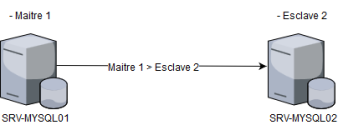
Configuring the Master Server
On the master server, grant permission to connect from the slave server with the ‘replicationuser’ user:
GRANT REPLICATION SLAVE ON *.* TO 'replicationuser'@'10.0.0.2' IDENTIFIED BY 'password';
Prepare the database:
USE bdd;
FLUSH TABLES WITH READ LOCK;
Then run:
SHOW MASTER STATUS;
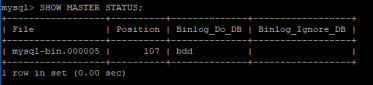
This will retrieve the “position” and “File” values needed for the slave to connect.
Configuring the Slave
On the slave server, configure the connection information to the master:
CHANGE MASTER TO MASTER_HOST='10.0.0.1', MASTER_USER='replicationuser', MASTER_PASSWORD='password', MASTER_LOG='mysql-bin.000005', MASTER_LOG_POS=107;
Then start the slave:
START SLAVE;
Testing
You can view the connection status with the master by running on the slave:
SHOW SLAVE STATUS;
Use this command to verify the slave can contact its master. You can also insert data on the master and verify it was replicated to the slave.
Master-Master Relationship
In a Master-Master relationship, both servers can read and write to the database and replicate each other’s modifications. To set up this relationship, simply create a Master-Slave relationship in the opposite direction from the one created in the previous section.
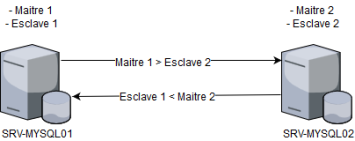
Configuring the Master Server
On the master server, grant permission to connect from the slave server with the ‘replicationuser’ user:
GRANT REPLICATION SLAVE ON *.* TO 'replicationuser'@'10.0.0.1' IDENTIFIED BY 'password';
Apply the new permissions:
FLUSH PRIVILEGES;
Prepare the database:
USE bdd;
FLUSH TABLES WITH READ LOCK;
Then run:
SHOW MASTER STATUS;
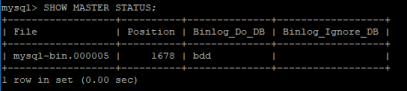
This will retrieve the “position” and “File” values needed for the slave to connect.
Configuring the Slave
On the slave server, configure the connection information:
CHANGE MASTER TO MASTER_HOST='10.0.0.2', MASTER_USER='replicationuser', MASTER_PASSWORD='password', MASTER_LOG='mysql-bin.000005', MASTER_LOG_POS=1678;
Then start the slave:
START SLAVE;
Testing
View the connection status:
SHOW SLAVE STATUS;
Use this command to verify the slave can contact its master. To test replication, connect to server 2 and insert a value. Then connect to server 1 and verify the data was replicated.
HAProxy Load Balancing
HAProxy allows distributing the flow of SQL queries across both servers using the round robin method (query 1 goes to server 1; query 2 to server 2; query 3 to server 1, etc.). HAProxy achieves this through its ability to analyze and redirect the Transport layer of the OSI model (layer 4).
Installation
To install HAProxy:
apt-get install haproxy
If the package is not found, add the repositories:
echo deb http://httpredir.debian.org/debian wheezy-backports main | \
tee /etc/apt/sources.list.d/backports.list
curl https://haproxy.debian.net/bernat.debian.org.gpg | \
apt-key add -
echo deb http://haproxy.debian.net wheezy-backports-1.4 main | \
tee /etc/apt/sources.list.d/haproxy.list
apt-get update
apt-get install haproxy -t wheezy-backports
Configuration
Modify the “/etc/haproxy/haproxy.cfg” configuration file to set up load balancing:
global
log /dev/log local0
log /dev/log local1 notice
chroot /var/lib/haproxy
stats socket /run/haproxy/admin.sock mode 660 level admin
stats timeout 30s
user haproxy
group haproxy
daemon
# Default SSL material locations
ca-base /etc/ssl/certs
crt-base /etc/ssl/private
# Default ciphers to use on SSL-enabled listening sockets.
ssl-default-bind-ciphers ECDH+AESGCM:DH+AESGCM:ECDH+AES256:DH+AES256:ECDH+AES128:DH+AES:ECDH+3DES:DH+3DES:RSA+AESGCM:RSA+AES:RSA+3DES:!aNULL:!MD5:!DSS
ssl-default-bind-options no-sslv3
defaults
log global
option dontlognull
timeout connect 5000
timeout client 50000
timeout server 50000
errorfile 400 /etc/haproxy/errors/400.http
errorfile 403 /etc/haproxy/errors/403.http
errorfile 408 /etc/haproxy/errors/408.http
errorfile 500 /etc/haproxy/errors/500.http
errorfile 502 /etc/haproxy/errors/502.http
errorfile 503 /etc/haproxy/errors/503.http
errorfile 504 /etc/haproxy/errors/504.http
listen mysql-cluster
bind *:3306
mode tcp
option mysql-check user haproxy_check
balance roundrobin
server SRV-MYSQL01 10.0.0.1:3306 check
server SRV-MYSQL02 10.0.0.2:3306 check
Restart HAProxy:
service haproxy restart
Create the “haproxy_check” user on both MySQL servers so HAProxy can check server status (for failover):
INSERT INTO mysql.user (Host,User) values ('10.0.0.100','haproxy_check');
FLUSH PRIVILEGES;
Then create on both MySQL servers the user we will use to connect, which must be able to connect from the load balancer’s address:
GRANT ALL PRIVILEGES ON *.* TO 'haproxy_root'@'10.0.0.100' IDENTIFIED BY 'Password' WITH GRANT OPTION;
FLUSH PRIVILEGES;
Testing
Test the load balancing by connecting and disconnecting multiple times to the HAProxy server.
Returns “1”:
mysql -u haproxy_root -pPassword -h 10.0.0.100
SELECT @@server_id;
Returns “2”:
mysql -u haproxy_root -pPassword -h 10.0.0.100
SELECT @@server_id;
Returns “1”:
mysql -u haproxy_root -pPassword -h 10.0.0.100
SELECT @@server_id;